|
Example 2 and Example 4 on the TI-Nspire CX II |
|
|
Let's see what the graphing calculator can do to solve "Example 2" and "Example 4"
from the Algebra 2 lesson, "Constructing Exponential Functions".
using an exponential regression formula.

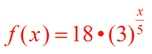
| The algebraic solution for Example 2 was: |
 |
|
 AGAIN: AGAIN:
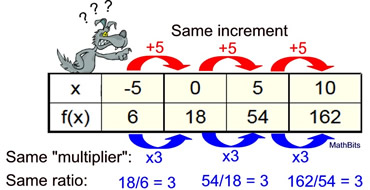
The table at the right shows values from an exponential function.
Find the values of a and b, and express an equation that may be represented by this table.
With use of the graphing calculator, the difficulty level will be lowered to MODERATE. |
|
 |
Solution: We will be using the graphing calculator's ability to prepare an exponential regression equation to find the solution to this problem. Under these conditions, we will be obtaining the actual equation (and not an approximation, or best fit, for the equation).
Press doc.
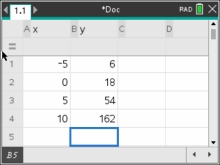
Add a Data & Statistics page. Label the columns,
(such as x and y).
Enter the four points.
|
From Data & Statistics page,
Press MENU - Statistics - Stat
Calculations, - Exponential
Regressions.
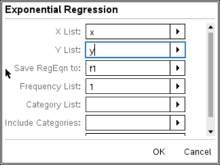
Enter
column names. OK
 |
The calculator will display the values for a and b. Use the
arrow in the lower right corner
to see the columns more
clearly.
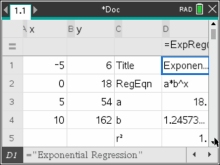 |
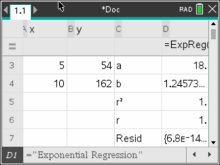 Arrow down to see r2 = 1 and r = 1 telling us we hit ALL of the points for an actual equation. Arrow down to see r2 = 1 and r = 1 telling us we hit ALL of the points for an actual equation.
|
a = 18 and b = 1.24573093962
Equation: f (x) = 18•(1.24573093962)x
Move edge of column to the right to see all decimals in "b".
But this doesn't match the algebraic answer, or does it?
Put those exponent skills to use!

It does match!
|
|
| The algebraic solution for Example 4 was: |
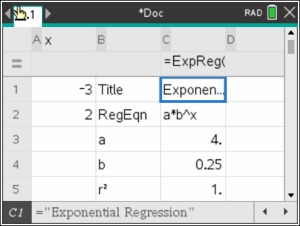
f (x) = 4•(0.25)x |
|
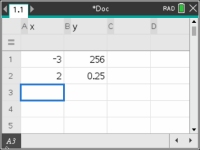
Example 4 AGAIN: (calculator) Find an exponential function of the form f(x) = abx which will pass through the points (-3,256) and (2, ¼). Round to nearest hundredths if needed.
We will solve this again, using the exponential regression capabilities of the graphing calculator. |
Solution:
Enter the two points into a spreadsheet
 |
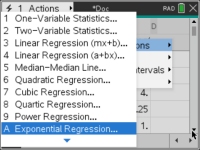
Press MENU, # Statistics,
#1 Stat Calculations,
#A Exponential Regression
|
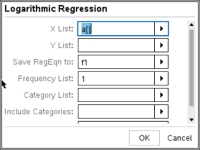
Fill in the column names you used for your spreadsheet.
Press OK.
 |
|
a = 4
b = .25
Equation: f (x) = 4•(0.25)x
|
Return to the Algebra 2 lesson on Constructing Exponential Functions in Algebra 2.

NOTE: The re-posting of materials (in part or whole) from this site to the Internet
is copyright violation
and is not considered "fair use" for educators. Please read the "Terms of Use". |
|
|